





Marq Lighting Gesture Beam 400 - Frequently Asked Questions
The Marq Lighting Gesture Beam 400 projects a crisp, tight beam for precise aerial effects and also offers a searchlight feature with stand alone sky-scanning mode. Four slave modes create complex auto programs without a DMX controller and the full color menu conveys all the essential information quickly and clearly. This guide will help answer questions about setting up the Marq Lighting Gesture Beam 400 and how to use it properly.
Frequently Asked Questions
What does the Marq Lighting Gesture Beam 400 come with?
The Marq Lighting Gesture Beam 400 includes:
- Gesture Beam 400
- Power cable (IEC cable)
- DMX cable
Does the Marq Lighting Gesture Beam 400 have DMX capability?
Yes it does! The Gesture Beam 400 has the traditional DMX IN and DMX OUT jacks built in. This will allow you to use these lights with a qualified DMX controller, and with the proper DMX Cables.
What is DMX?
DMX is a lighting control protocol. Here is a to a great article that will help explain the fundamentals of DMX.
How do I setup the Marq Lighting Gesture Beam 400 with a DMX controller?
If you are going to use the Marq Lighting Gesture Beam 400 with a DMX controller, follow the steps suggested below:
- Connect a DMX cable from the DMXoutput on the DMX controller that you are using, and attach it to the DMX input on the Gesture Beam 400. Below is a picture showing this.
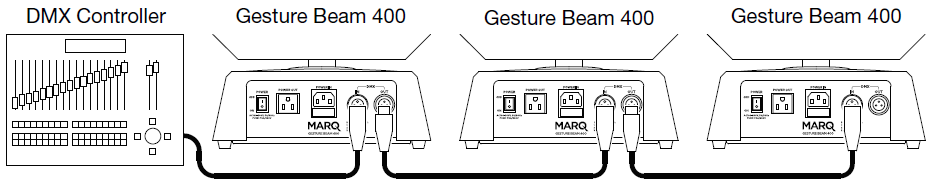
- You can chain up to 32 Gesture Beam 400 units together by linking each through the built in DMX output to the DMX input of the following unit.
Does the Marq Lighting Gesture Beam 400 have a sound active mode?
The Gesture Beam 400 does have an automatic "sound active" mode. This allows the unit to operate independently and perform an "easy show" for you, free of a DMX controller.
How do I setup the Marq Lighting Gesture Beam 400 in Slave mode?
The Gesture Beam 400 has a slave mode so you can connect multiple Gesture Beam 400's together and have them sync up. The Slave mode for the Gesture Beam 400 has 4 different modes that will give you variations of colors and patterns and will stay in sync with the master Gesture Beam 400. These modes allow you to have a bit more fun with your standalone units while keeping them all in time.
What is the Powerlink feature?
The Powerlink feature lets you link up to 6 Gesture Beam 400's together with power cables (IEC cables). One reason to do this may be if you have a shortage of wall outlets or power supplies to plug multiple units into. You can then power all of them when having just one Marq Lighting Gesture Beam 400 connected to a wall outlet.
- Insert the included power cable into the wall and then the other end into the Marq Lighting Gesture Beam 400.
-
On the opposite power plug on the Marq Lighting Gesture Beam 400 you will see a power jack that works the opposite way. On this jack plug the opposite end of an IEC cable here.

- Now plug the other end of the power cable into the power jack of another Marq Lighting Gesture Beam 400. This will supply power to the Marq Lighting Gesture Beam 400.
Further Technical Support
Whether you are a customer or dealer, if you already own a Marq product, or if you just have pre-sales questions, the Marq technical support team is available to help!
Visit the link below to connect with any of the following support options: online community support, phone support, email support.
 This guide walks through the download, activation, and installation process for the Cubase LE 7 software that comes with a number of InMusic Brand products.
  Many users of the Numark Mixtrack Pro choose to use Virtual DJ as their performance software of choice. Although the setup process requires relatively little configuration, there are a few key points to note to ensure that everything works correctly. This article covers software compatibility and updates, hardware connections and controls, and audio output configuration.